


Clock, Date and Weather Widget
3.744.00 Reviews
App Specs
- Version
- 1.1.3
- Updated On
- License
- Free
- Downloads
- 100,000+
- Developer
- aac
- Categories
- Weather
- Platform
- Android
Screenshots
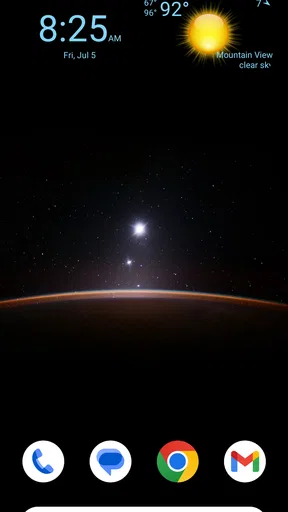
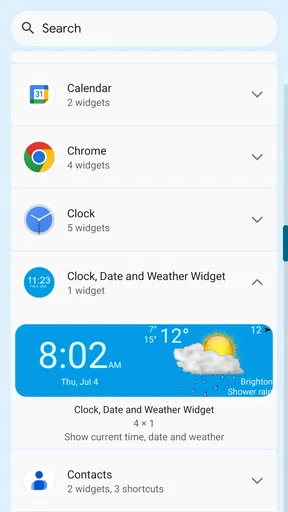
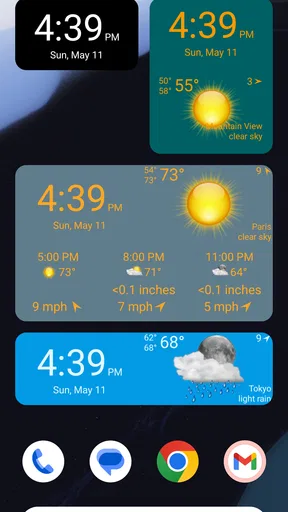
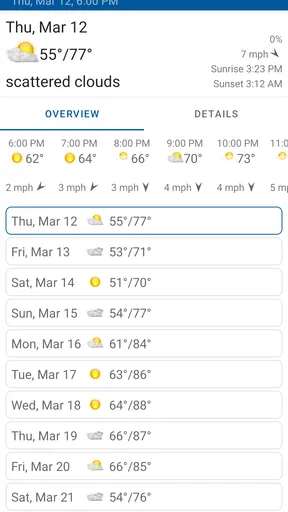
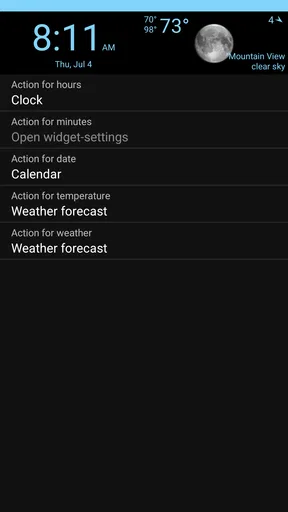
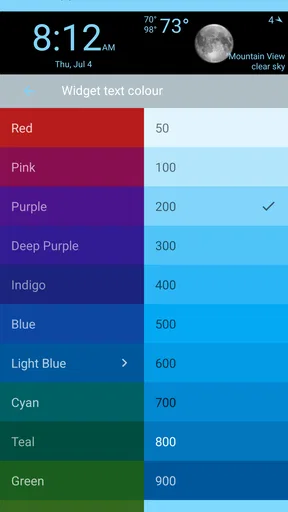
 Analysis by AppCompare
I like home-screen tools that earn their space by answering a question before I open another app. Clock, Date and Weather Widget takes that simple idea and keeps its focus narrow: it places the time, date, and current weather where I can see them immediately. It is a free weather app from aac, aimed at anyone who wants a glanceable home screen rather than a full forecast dashboard.
After using it as a daily reference, my impression is straightforward: this is more useful as a quiet home-screen companion than as a complete weather service. The appeal is the combination of three pieces of information in one place. The trade-off is that people who need detailed forecasts, radar, alerts, or extensive customization may find the experience too limited. Its best quality is convenience, not depth.
How the widget feels during ordinary use
The first thing I noticed is that the app’s purpose is easy to understand. The clock handles the time, the date removes the need to open a calendar, and the weather gives me a quick sense of current conditions. That makes it particularly handy on a home screen I check often, such as the first page beside my most-used apps.
In practice, this kind of design can feel faster than opening a traditional weather app because it removes several steps. I do not need to search for the weather icon, wait for a forecast screen, and then return to what I was doing just to decide whether I need a jacket. The information is already part of the screen I am looking at.
That does not mean every interaction is automatically instant. A widget still depends on the phone updating its displayed information, and weather information is naturally more useful when it is current. I would describe the perceived speed as good for quick checking, while avoiding the expectation that it replaces a dedicated forecast screen for more involved questions.
A practical morning routine
A realistic use case is checking the phone while getting ready for work or school. The time helps me judge whether I am running late, the date prevents those small scheduling mistakes, and the weather gives me an immediate outdoor cue. I can make that decision without opening three separate tools.
There is also a useful benefit for phones where the clock is visually easy to miss. A clearly placed widget can make the home screen feel more intentional, especially when the user prefers a simple layout. I would place it somewhere visible but not so large that it pushes essential apps onto another page.
Worth Reading Before You Choose

EA SPORTS FC Mobile 26 Is a Bigger Football Game, but It Takes Time

Flipboard Shows What News Apps Must Do Beyond the Feed

Switching to Android Auto Means Rethinking Your Driving Routine

Google Calendar Makes a Crowded Week Easier to Manage

Ludo King Makes the Most of the Minutes Between Plans

Baby Panda World Brings Quick Play to Modern Phones, but Its Game Library Feels Busy
One tip is to treat the widget as a glance layer rather than a source for every weather decision. If I only need to know what conditions are like right now, it fits well. If I am planning a trip, outdoor activity, or commute several hours ahead, I would still open a more detailed weather service and check the broader forecast.
What happens when the phone is busy
The app’s workload is naturally modest compared with a navigation tool, video editor, or game. Its main job is to display a small set of changing information, so I would not choose it because I expect demanding processing. That is a strength for users who want a lightweight home-screen addition rather than another large destination app.
Heavy-use moments are more likely to involve the phone than the widget itself. For example, when many apps are open, the device is conserving power, or the system is managing background activity, a displayed weather value may not feel as fresh as it did after a manual refresh in a full weather app. I would not interpret that as a reason to avoid it, but it is an important distinction between a glanceable widget and an actively consulted forecast tool.
The sensible workflow is to use the widget for routine awareness and switch to a dedicated weather app when accuracy over time matters. That division keeps the home screen convenient without asking a small widget to do a job it was not designed to replace.
Another practical tip is to avoid judging the app only by how often you look at it. A widget can be valuable precisely because it reduces the number of interactions needed. If it saves me from opening an app several times a day for a basic check, its usefulness comes from that low-friction habit rather than from a long list of features.
Reliability and recovery in daily use
For a home-screen display, reliability means more than simply launching successfully. I want the clock and date to remain useful at a glance, and I want the weather portion to recover sensibly when the phone has been offline or the system has paused background activity. This is where expectations should remain realistic: current weather is dependent on information being refreshed, while the clock and date are inherently tied to the device’s own time display.
If the weather looks stale, my first response would be practical rather than dramatic. I would open the app, check whether the phone has a working connection, and revisit the widget after the device has had a moment to update. I would also check whether the widget is still placed on the home screen after changing launchers, restoring a backup, or reorganizing pages. These are ordinary Android issues that can affect any widget.
The recovery experience matters because a home-screen tool is supposed to reduce effort. If I have to repeatedly repair it, it loses its main advantage. My recommendation is to give it a short trial in the exact routine where I plan to use it: on the home screen, during a normal day, with the phone’s usual battery and connectivity settings. That reveals more than testing it only from the app icon.
The developer is listed as aac, and the app has built a modest but real audience, with over one hundred thousand installs. Its average rating is 3.7 from around five hundred ratings, which suggests a mixed but meaningful reception rather than universal approval. I read that as a reason to keep expectations balanced: the concept is useful, but the experience may not satisfy everyone who wants a richer weather product.
Device compatibility and practical limits
The app supports Android devices running version 6.0 or newer, so it is not restricted to only recent phones. That makes it a reasonable candidate for people using older hardware that still handles everyday apps well. At the same time, compatibility does not guarantee that every phone will present a widget identically. Home-screen launchers, screen sizes, and manufacturer software can change how much space the display occupies and how naturally it fits into a layout.
I would be especially careful on a compact screen. A widget that looks balanced on a larger display may compete with icons on a smaller one. The best placement is usually the one that preserves quick visibility without forcing the rest of the home screen into a crowded arrangement. If the widget makes the phone harder to navigate, its convenience has been cancelled out.
Resource demands are another reason the app may appeal to users who prefer simple tools. It is not presented as a full weather suite with layers of content, so there is less reason to expect the same visual or functional weight as a dedicated forecast application. Still, I would not promise that it has no effect on battery or background activity. Weather information has to be kept reasonably current, and the exact impact can vary by device and system settings.
For that reason, I would watch the phone’s normal battery behavior during the first few days rather than changing every setting immediately. If the widget works well with the phone’s existing configuration, leave it alone. If updates seem delayed, review the device’s battery-saving rules before assuming the app itself is unreliable. This is a useful troubleshooting habit for any home-screen weather display.
Where it beats ordinary alternatives
The usual alternative is a standalone weather app. That option is better when I want hourly conditions, several days of planning, maps, warnings, or a deeper explanation of what the weather is doing. A dedicated app gives me a destination for research, while this widget is better at passive visibility.
Another alternative is relying on the phone’s standard clock and a separate weather shortcut. That may be perfectly adequate, but it divides the information across different places. The appeal here is consolidation: the time, date, and current weather can occupy one home-screen area instead of requiring separate glances or app launches.
I also think it suits people who dislike busy interfaces. Many weather apps lead with large forecast cards, changing illustrations, news, alerts, and multiple navigation sections. Those features can be useful, but they also create visual noise. This app’s narrower purpose makes it easier to keep the home screen calm.
The trade-off is customization and detail. Users who enjoy tailoring every element of a widget, comparing locations, or reading a long forecast should look elsewhere. I would also skip it if my main requirement is severe-weather awareness or trip planning. A compact current-weather display is not the same thing as a full decision-making tool.
Cost, version, and what to expect
The app is free to download, with in-app purchases listed at $5.99 per item. That makes it easy to try without paying upfront, but I would look carefully at any optional purchase screen before committing. The important question is whether the free experience already covers the simple clock, date, and weather routine I want. If it does, there may be no reason to spend more.
The current version is 1.1.3, and the app was released on April 27, 2023. Those details place it as a relatively focused product rather than a long-established weather platform that I would automatically expect to have every advanced feature. I would judge it on how well it handles its central purpose instead of comparing it feature for feature with major forecast services.
Its Everyone content rating also makes it broadly approachable for ordinary household use. That does not change the practical advice about weather accuracy or device behavior, but it does reinforce the app’s uncomplicated character. This is a utility for quick information, not an entertainment product or a specialized professional instrument.
Small habits that make the experience better
I found three habits especially useful when thinking about this type of widget. First, place it on the home-screen page I naturally visit instead of hiding it on a secondary page. The benefit comes from visibility, so placement matters more than decoration.
Second, use it as a trigger for a deeper check rather than as the only source of planning information. A quick glance can tell me whether conditions look suitable right now; a separate forecast can answer whether that will still be true later. This two-step workflow avoids both unnecessary app opening and overconfidence in a compact display.
Third, test it after the phone has been idle for a while. A widget that looks fine immediately after setup may behave differently after the device has spent the night unused or after battery-saving rules have taken effect. Checking it in the morning is particularly relevant because that is when many people rely on a weather glance to choose clothing and travel plans.
A fourth useful habit is to keep the home screen uncluttered around it. The widget is most effective when the eye can find the clock, date, and weather without competing labels and folders. I would rather give it a clean, moderate amount of space than enlarge it until it dominates the whole screen.
Who should install it, and who should pass
I would recommend it to someone who wants a simple weather widget that combines basic daily information in one visible location. It is a good fit for a minimal home screen, an older compatible Android phone, or a routine where the user repeatedly checks the time and current conditions but does not need a full forecast every time.
It is also suitable for people who prefer low-effort tools. The main value is not learning a complicated interface; it is reducing small interruptions. For a busy morning, a quick glance can be enough to make a simple decision and move on.
I would not recommend it as the only weather app for someone who travels frequently, monitors changing conditions closely, or plans outdoor work several hours in advance. Those users need more context than a compact home-screen display normally provides. A detailed weather service is the better choice when forecasts, alerts, and location management are central requirements.
I would also pass if I wanted a highly configurable widget with a large selection of layouts and data points. The focused design is attractive precisely because it does not try to become everything at once, but that same focus can feel restrictive to enthusiasts.
My performance verdict
My overall view is positive but measured. Clock, Date and Weather Widget makes sense when the goal is quick awareness: time, date, and current weather without opening a separate destination app. Its perceived speed should be good for glances, its workload appears suited to a lightweight utility, and its value is strongest when it stays visible and uncomplicated.
The main limitation is not that it lacks ambition; it is that a simple widget cannot replace a complete weather service. Freshness can depend on the phone’s background behavior and connectivity, while detailed planning requires a different kind of interface. I would install it, test it through a normal morning routine, and keep it if the information remains convenient and current enough for my needs.
With a free starting point, support for Android 6.0 and newer, and an Everyone rating, it is easy for the right user to try. My final recommendation is therefore specific: choose it for a clean, glance-first home screen, but choose a dedicated forecast app when weather decisions require depth, timing, or stronger situational detail.
Pros
- Combines time
- date
- and weather in one compact home-screen widget.
- Offers several layout and style options for different home screens.
- Weather details are easy to check without opening a separate app.
- Useful at a glance for planning commutes
- errands
- and outdoor activities.
- Supports quick access to essential information with minimal interaction.
Cons
- Some designs or features may require in-app purchases.
- Weather accuracy depends on the selected location and data provider.
- Frequent weather updates can increase battery or data usage slightly.
- Widget appearance may vary between Android launchers and devices.
- Limited space can make detailed forecasts difficult to read at a glance.
FAQs for Clock, Date and Weather Widget
What is Clock, Date and Weather Widget?
Clock, Date and Weather Widget is a customizable home-screen widget that combines the current time, date, and weather information in one convenient display. After adding it to your Android or iOS home screen, you can usually view essential details without opening a separate app. Its usefulness depends on the available layouts, weather data sources, and the level of customization supported by your device.
Does Clock, Date and Weather Widget require an internet connection or location access?
An internet connection is generally needed to update weather conditions, forecasts, temperatures, and other meteorological information. The clock and date can normally continue working offline, although weather data may become outdated. Location permission may also be requested to identify your area automatically. If you prefer greater privacy, you may be able to deny location access and enter a city manually, depending on the app’s settings.
Can I customize the appearance of the Clock, Date and Weather Widget?
The widget is designed to offer more than a basic time display, and customization is one of its main attractions. Available options may include different clock styles, date formats, weather icons, colors, fonts, transparency levels, and widget sizes. However, the exact choices can vary according to the operating system and device. Some advanced designs or features may also require advertising support or a premium upgrade.
Is Clock, Date and Weather Widget free to download and use?
The application may be available as a free download, but users should check its store listing for the exact pricing model before installing it. Free versions commonly include advertisements, limited themes, or fewer customization tools. Optional in-app purchases may unlock additional layouts, remove ads, or provide enhanced forecast features. Always review the permissions, subscriptions, and payment terms shown in the official app store.
Why is the weather information or widget not updating correctly?
Weather updates can be affected by several factors, including a weak internet connection, disabled location services, restricted background activity, battery-saving settings, or an outdated weather provider. First, confirm that the app has the required permissions and that your selected location is correct. If the widget remains frozen, open the app manually, refresh the data, remove and re-add the widget, or update the application to its latest version.


